
Free and Pro run the same screener on the same data. The difference is how much of it you see and how fast: the top 25 matches every 15 seconds on Free, every match as it happens on Pro, plus Pro’s extra columns and more alerts.
Visitor, Free and Pro side by side
| Visitor (no account) | Free | Pro | |
|---|---|---|---|
| Matches shown | Top 10 | Top 25 | Every match |
| Table updates | Every 15 seconds | Every 15 seconds | Real time, about every second |
| Rules applied per screen | 2 | 2 | Unlimited |
| Pro columns | 🔒 | 🔒 | All included |
| Saved screens | – | 3 | Unlimited |
| Saved layouts | – | 3 | Unlimited |
| Alerts | – | 2 | 30 |
| Alert notifications | – | 10 a day | No daily limit |
| Alert history | – | 7 days | 90 days |
| Price | Free | Free | $39/month, or $390/year |
What’s the same on every plan
- Every screen runs on all 3,200+ pairs on Binance, Kraken and Coinbase. Free shows the top 25 of the matches, but nothing is left out of the search.
- All timeframes from 5 minutes to weekly, Now and Last candles, RSI, and the rolling 24h columns.
- The ready-made screens and layouts, share links, and Telegram, browser and email alerts.
- Alerts are checked in real time on both plans. Free limits how many you have and how many notifications they send, not how fast.
What each limit looks like
Nothing is hidden or deleted when you reach a limit. Coinlyzer marks what isn’t applied and says why. This is a visitor screen with a Pro column in its rules and in its layout:
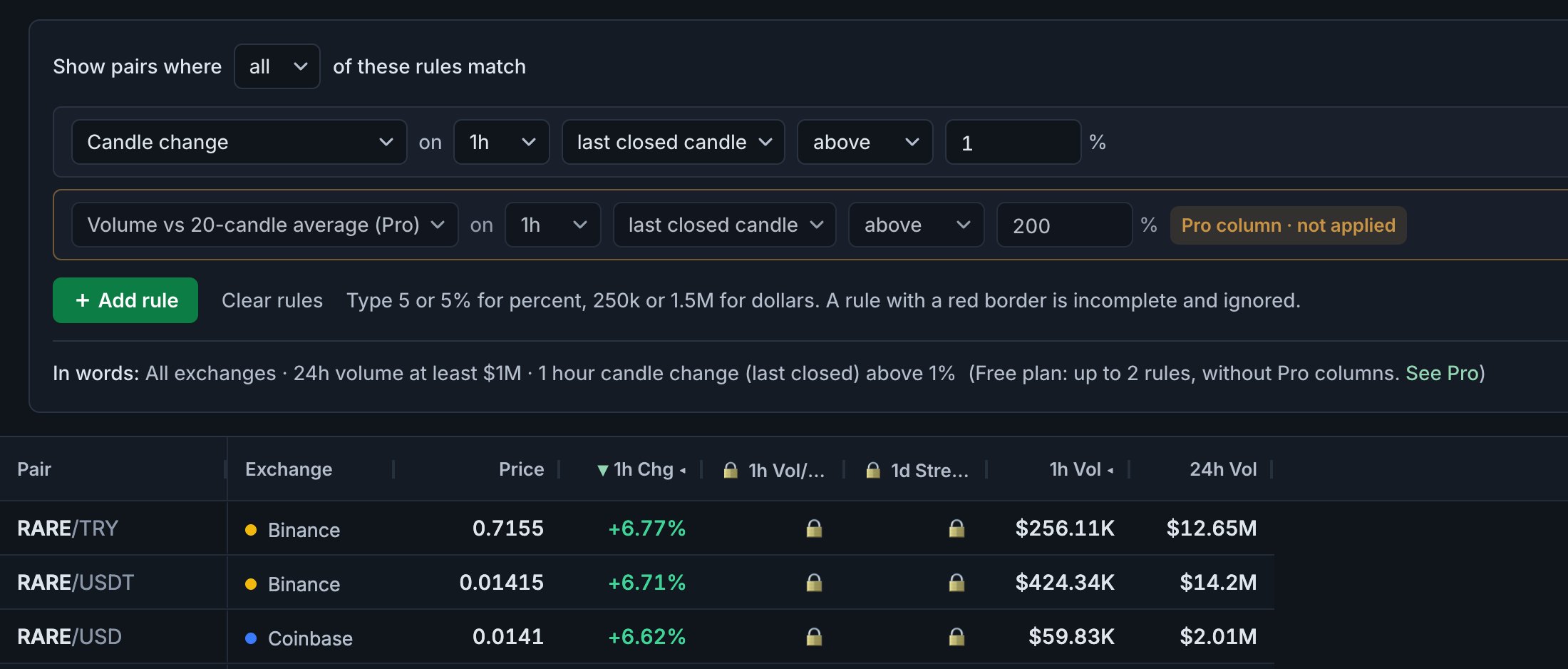
- Rows. A bar above the filters says how many pairs match and that it’s showing the top 25, updated every 15 seconds. Sort the table to choose which 25 you see.
- Updates. Instead of Live, the app bar shows a countdown to the next update.
- Rules. The first two complete rules on regular columns apply. A third is marked Over the Free limit · not applied; a rule on a Pro column, Pro column · not applied.
- Pro columns. Change over 2–24 candles, green/red streaks, volume vs previous candle, volume vs 20-candle average and candle range. They’re marked PRO in the Columns panel and show 🔒 in the table.
- Saved screens and layouts. Saving a fourth asks you to replace or delete one. Saving under an existing name replaces it.
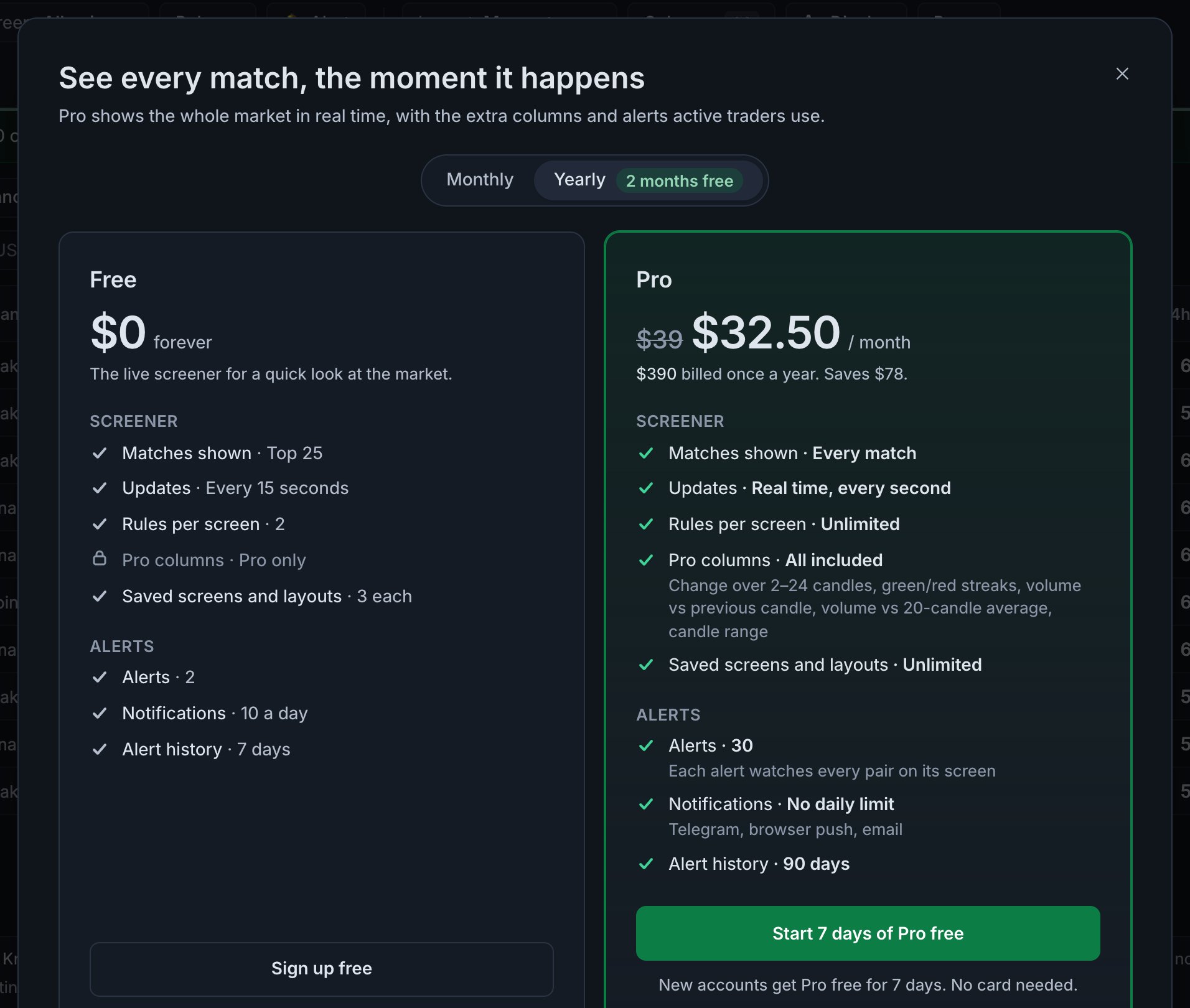
Clicking a not applied label, a PRO button in the Columns panel or Upgrade to Pro opens the comparison, with prices:
Alerts on the Free plan
- 2 alerts, each on a screen with up to 2 rules and no Pro columns. On a bigger screen, 🔔 Alert explains the limit first.
- Up to 10 notifications a day. After that, what fires still goes into your history, marked Not sent: Free plan’s daily limit, with the pairs hidden. The count starts again at 00:00 UTC.
- Alerts made during the trial that go beyond Free are Paused, not deleted, with the reason next to the name. They start again when you upgrade.
The 7-day trial and prices
New accounts get Pro free for 7 days, with no card. When the trial ends, the account moves to Free unless you subscribe. Pro costs $39 a month, or $390 a year ($32.50 a month, saving $78). See pricing for the full comparison.
See what Free shows you
Visitors get the top 10 matches; a free account shows 25, saves screens and sends alerts. New accounts start with 7 days of Pro.
FAQ
Is the Coinlyzer Free plan really free?
Yes, with no card and no time limit: the top 25 matches of any screen, updated every 15 seconds, with 2 rules per screen and 2 alerts.
Does Free screen fewer pairs?
No. Every screen runs on all 3,200+ pairs. Free shows the top 25 of the matches, in the order of the table’s sort.
Are alerts slower on Free?
No. Alerts are checked in real time on both plans. Free has 2 alerts and up to 10 notifications a day.
What happens to my Pro settings when the trial ends?
Nothing is deleted. Rules over the Free limit are marked not applied, Pro columns show 🔒, and alerts beyond Free are paused until you upgrade.
How much is Pro?
$39 a month, or $390 a year, which works out to $32.50 a month.
Next guide
Why Coinlyzer’s numbers differ from your exchange app
A pair was up 69.8% on the 24h change and 12.8% on today’s candle at the same moment. Rolling vs candle, UTC, USD volume, different markets and timing explained.
Coinlyzer shows market data only. Screens and examples in this guide show how the product works; they are not investment advice or a recommendation to buy or sell anything. Screenshots may differ slightly from the app as it improves.