
Rules are how you tell Coinlyzer what you’re looking for. Each rule checks one number for every pair, such as “the last 4-hour candle closed up between 2% and 8%”, and the table keeps the pairs that pass. You build rules from menus, so there’s nothing to memorise.
The parts of a rule
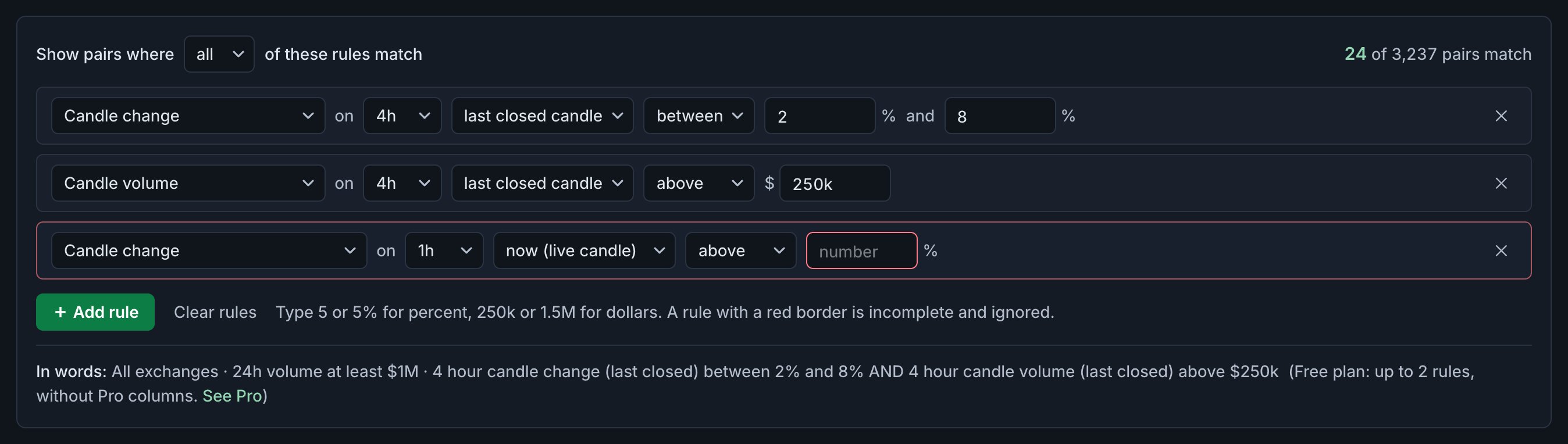
Read a rule from left to right, like a sentence:
| Part | Example | What it does |
|---|---|---|
| Metric | Candle change | What is measured. 12 choices: the nine candle metrics, plus price, 24h change and 24h volume |
| Candle count | 20-candle high | Only for Change over N candles and Close vs N-candle high |
| Timeframe | on 4h | The candle size, from 5m to 1w |
| Candle | last closed candle | The live candle (now) or the last closed one |
| Operator | between | above, at least, below, at most or between |
| Value | 2 % and 8 % | The number to compare with, in the metric’s unit |
Build one, step by step
Open Rules
Click Rules in the app bar. The number on the button is how many rules your screen has. The rules panel opens above the table.
Click + Add rule
A new rule appears: candle change on 1h, now, above 5%. It’s a starting point; change any part of it.
Pick the metric
Open the first menu. When you switch metric, the operator and value reset to a sensible start for it, for example below 30 for RSI or above $100K for candle volume, so you rarely start from a meaningless number.
Pick the timeframe and the candle
Choose the candle size after on, then now (live candle) or last closed candle. For measures over several candles the choices read ending now (live candle) and ending with last closed. Not sure which? Now vs Last explains the difference.
Pick the operator and type the value
- above and below leave the value itself out; at least and at most include it.
- between adds a second box. Both ends count, and the order doesn’t matter: “between 8 and 2” works too.
The difference between above and at least matters for whole numbers. A green/red streak “above 3” needs four green candles in a row; “at least 3” needs three.
Add more rules the same way. The menu at the top (“Show pairs where all / any of these rules match”) decides whether a pair must pass every rule or just one; see All vs Any. ✕ at the end of a row deletes that rule; Clear rules deletes them all.
Typing values
The value box understands what traders usually type. The unit is shown next to it: % for changes, $ for volume.
| You type | It means | Typical use |
|---|---|---|
| 5 or 5% | 5% | Changes, ranges, volume vs average |
| -2.5 | −2.5% | Falling candles |
| 250k | $250,000 | Candle volume |
| 1.5M | $1,500,000 | Candle or 24h volume |
| $2B or 2,000,000,000 | $2,000,000,000 | Very large volume |
| 70 | 70 | RSI, which has no unit |
| 3 or -3 | 3 candles up, or 3 down | Green/red streak |
When a rule turns red
A rule with a red border is incomplete, so it’s ignored until you finish it. It happens when the value box is empty, holds something that isn’t a number, or a “between” rule is missing its second value. Your other rules keep working in the meantime, so the table never jumps to zero matches while you type.
A complete rule can still leave a pair out when the pair has no value for that column, usually because it was listed recently and doesn’t have enough candles yet. Pairs with an empty cell never match a rule on that column.
Check what you built
- The match count at the top right of the panel updates as you edit: “24 of 3,237 pairs match”. If it drops to 0, a threshold is probably too strict for current markets.
- In words at the bottom spells out the whole screen, filters included. If it doesn’t say what you meant, a menu is set wrong.
- The table shows each rule’s column. If your layout doesn’t have it, Coinlyzer adds it at the end with a green header until you remove the rule.
4h candle up 2–8% on $250k
The two complete rules from the screenshot: the last 4-hour candle closed up 2% to 8% (a solid move, not a spike) on more than $250K of volume.
All exchanges · 24h volume at least $1M · 4 hour candle change (last closed) between 2% and 8% AND 4 hour candle volume (last closed) above $250k
3+ red daily candles, RSI under 35
Uses the sign on streaks: at least three red daily candles in a row, and the daily RSI is below 35 now.
All exchanges · 24h volume at least $1M · 1 day green/red streak (last closed) at most -3 AND 1 day RSI (14) (current) below 35
PROUses a Pro column (Green/red streak). On the Free plan that rule is locked; the 7-day free Pro trial includes it.
FAQ
How many rules can a screen have?
On Pro, as many as you need. On the Free plan the first 2 complete rules are applied; others stay in the screen, marked as not applied.
Why is my rule red?
It is incomplete: the value is empty or not a number, or a “between” rule is missing its second value. Red rules are ignored until you fix them.
Can I type 1M for a million?
Yes. The value box understands k, M and B (thousand, million, billion), with or without a $ sign or commas.
What is the difference between “above” and “at least”?
“Above 3” leaves 3 out; “at least 3” includes it. It matters most for whole numbers such as streaks.
Why does a pair with the right values not show up?
Check the filters (exchange, quote, minimum volume) and the all/any setting. Also check the candle: a rule on the last closed candle ignores what the live candle is doing.
Next guide
All vs Any: combining rules with AND or OR
The same two rules matched 15 pairs with All and 174 with Any. How AND and OR change a screen, when OR is the right choice, and how filters fit in.
Related
Coinlyzer shows market data only. Screens and examples in this guide show how the product works; they are not investment advice or a recommendation to buy or sell anything. Screenshots may differ slightly from the app as it improves.