
At the top of the rules panel is a sentence with a menu in it: “Show pairs where all / any of these rules match”. All means a pair must pass every rule (AND). Any means one is enough (OR). Same rules, very different lists.
All vs Any at a glance
| All (AND) | Any (OR) | |
|---|---|---|
| A pair must pass | Every rule | At least one rule |
| Adding a rule makes the list | Shorter (or the same) | Longer (or the same) |
| In words joins rules with | AND | OR |
| Good for | Narrowing down to one precise setup | Catching any of several setups |
| Risk | Too strict: nothing matches | Too loose: everything matches |
All is the default, and it’s what most screens need: each rule adds one more condition a pair has to meet.
Same rules, both ways
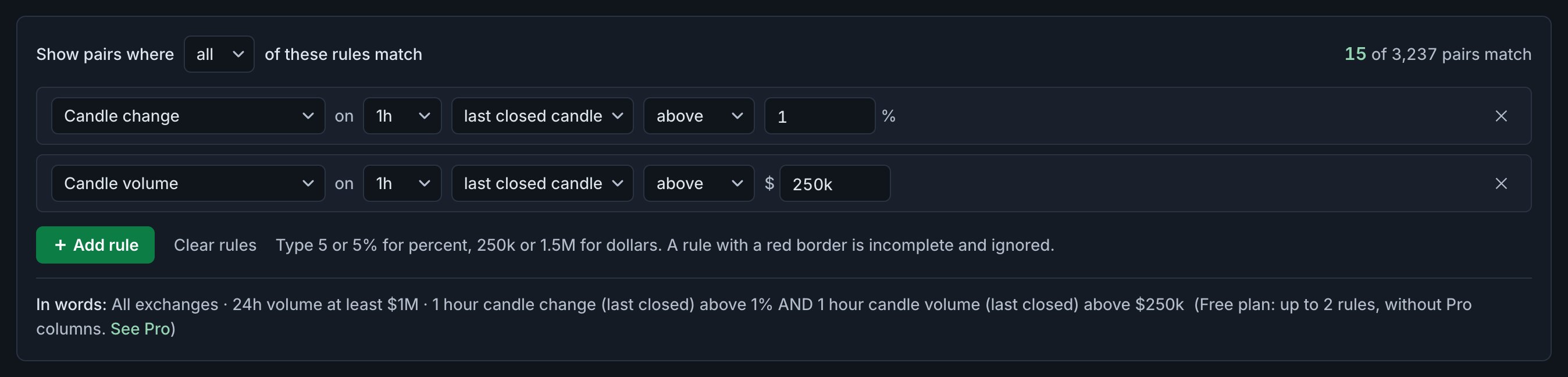
Two rules on the last closed hourly candle: it closed up more than 1%, and it traded more than $250K. Plus a filter for $1M of 24h volume. First with all:
Then the same two rules with any:
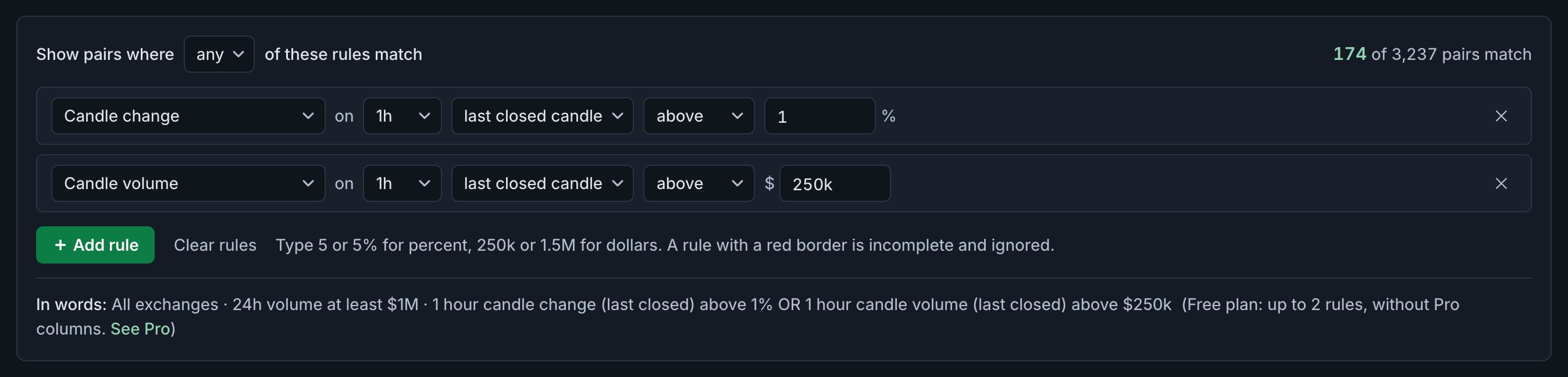
15 versus 174, from one menu. Here’s where the numbers come from:
| Pairs | |
|---|---|
| Up more than 1% (rule 1 alone) | 37 |
| More than $250K traded (rule 2 alone) | 152 |
| Both: what All shows | 15 |
| Either: what Any shows (37 + 152 − 15) | 174 |
The All list is what the two rules describe together: a move with money behind it. The Any list is mostly busy pairs that didn’t move: 137 of the 174 are there only because of the volume rule, which is easy to pass on its own.
Last hour: up 1% and $250k
All: the last hourly candle closed up more than 1% on more than $250K of volume.
All exchanges · 24h volume at least $1M · 1 hour candle change (last closed) above 1% AND 1 hour candle volume (last closed) above $250k
Last hour: up 1% or $250k
Any: the same two rules, but one is enough. Open both and compare the counts right now.
All exchanges · 24h volume at least $1M · 1 hour candle change (last closed) above 1% OR 1 hour candle volume (last closed) above $250k
When Any is the right choice
Any works best when every rule describes something you’d act on by itself:
- The same signal on several timeframes. RSI below 30 on the hourly or the 4-hour candle. Either one is a reason to look.
- Different setups you treat the same way. A close above the 20-day high or volume three times its average: two ways a pair can wake up.
- One alert for several setups. An alert fires when a pair starts matching its screen. With Any, one alert covers every rule.
RSI oversold on 1h or 4h
Any: the hourly or the 4-hour RSI is below 30, on pairs with $1M+ volume. The ready-made screen “RSI oversold (1h or 4h)” works the same way.
All exchanges · 24h volume at least $1M · 1 hour RSI (14) (current) below 30 OR 4 hour RSI (14) (current) below 30
Common mistakes
- One loose rule with Any. A rule that most pairs pass, like a low volume threshold, fills the list by itself, as in the example above. With Any, every rule must be strict enough to stand alone.
- Expecting Any to loosen the filters. Exchange, quote asset and minimum 24h volume always apply to every pair. With Any, a pair must pass all the filters and then one rule. See Filters.
- Zero matches with All. Each rule on its own may match plenty, but together nothing. Loosen one threshold at a time and watch the count at the top right of the panel.
Mixing AND and OR
A screen uses one setting for all its rules, so you can’t write “A and (B or C)” directly. Three ways around it:
- Move the AND part into filters. Exchange, quote asset and volume conditions belong there anyway, and filters always combine with AND.
- Use “between”. “Above 2 and below 8” is one rule: between 2 and 8. That frees a rule for something else. See Build a rule.
- Make two screens. “A and B” and “A and C”, each with its own alert if you want one.
FAQ
What does “all” mean in the rules panel?
A pair must pass every rule: the rules are combined with AND. It is the default.
What does “any” mean?
A pair needs to pass only one rule: the rules are combined with OR. The list is at least as long as each rule’s list on its own.
Do filters still apply with “any”?
Yes. Exchange, quote asset and minimum 24h volume always apply to every pair, whatever the setting.
Can I combine AND and OR in one screen?
Not directly. Put the AND part in the filters, use “between” for ranges, or make two screens.
Next guide
Screens vs layouts: what each one saves
A screen picks which pairs you see; a layout picks which columns you see them with. How the two combine, what each one saves, and why some columns appear on their own.
Related
Coinlyzer shows market data only. Screens and examples in this guide show how the product works; they are not investment advice or a recommendation to buy or sell anything. Screenshots may differ slightly from the app as it improves.