
Any screen with at least one rule can become an alert. Coinlyzer then checks it against every pair on Binance, Kraken and Coinbase, around the clock, and tells you when a pair starts matching. You don’t need the app open.
Create an alert
Open the screen you want to watch
Pick a ready-made screen or build your own: rules plus any exchange, quote and volume filters. The alert copies the screen as it is when you create it, filters included. See Build a rule.
Click 🔔 Alert in the app bar
You need a free account; as a visitor the button opens the sign-up form. If the screen has no rules yet, Coinlyzer asks you to add one first: without rules, every pair would match.
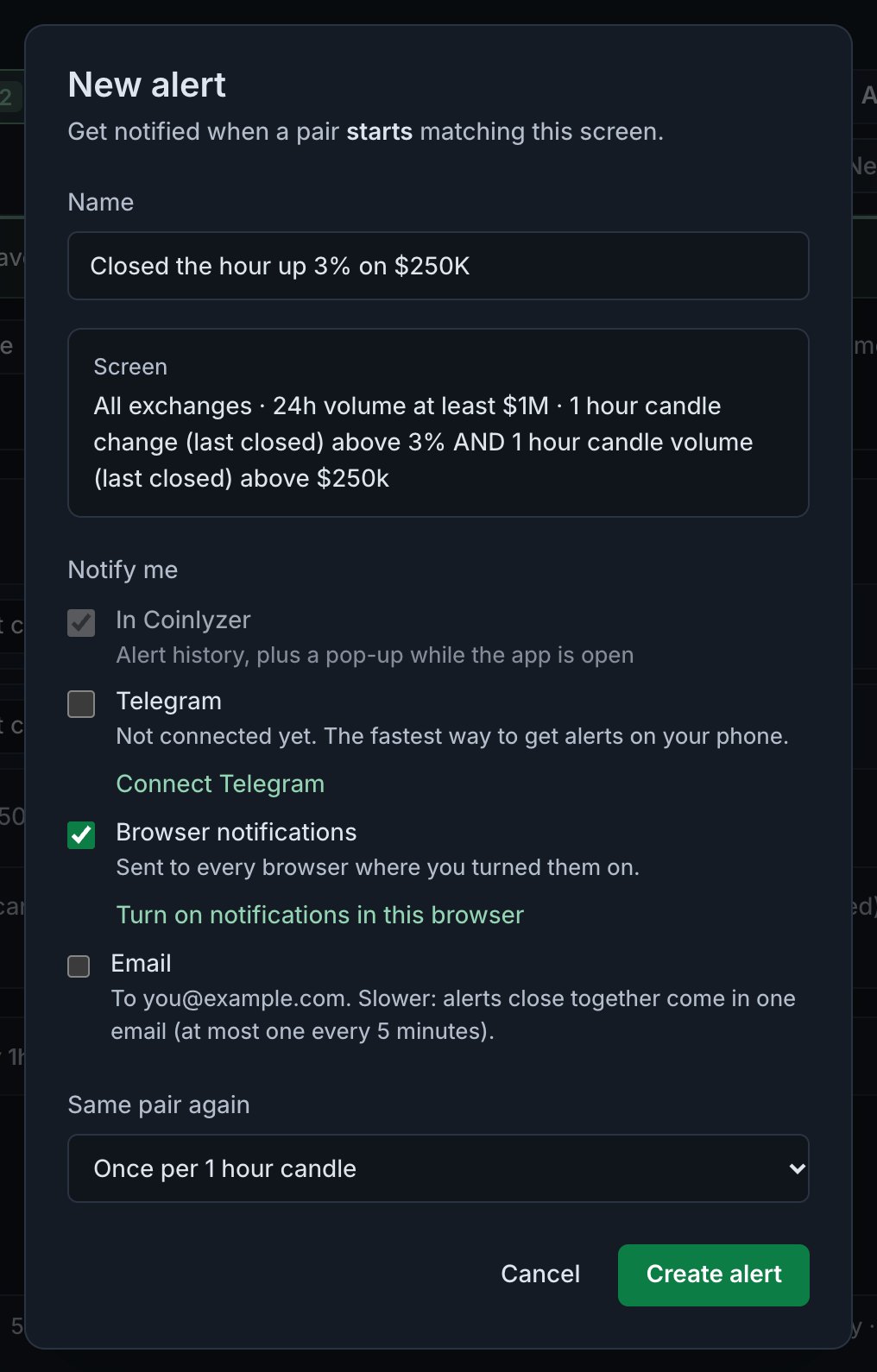
The New alert dialog, shown for a placeholder account (you@example.com). The Screen box spells out exactly what the alert watches. Check the name
It starts as the screen’s name. It’s what you’ll see in every notification, so make it say what happened, in up to 80 characters.
Choose where it reaches you
- In Coinlyzer is always on: a pop-up while the app is open, and a line in your alert history.
- Telegram is ticked by default once you’ve connected it; until then there’s a Connect Telegram link.
- Browser notifications are ticked by default. If they aren’t on in this browser yet, the browser asks when you save.
- Email is off by default. It’s the slowest: alerts close together come in one email.
Alert channels compared explains how fast each one is and which to pick.
Pick Same pair again, then Create alert
This sets how soon one pair can fire again (see below). A bar under the app bar confirms the alert is on. From now on it runs on Coinlyzer’s servers, whether or not you have the app open.
What “starts matching” means
An alert fires for a pair when it goes from not matching the screen to matching it. A pair that already matches doesn’t fire again and again while it stays in the list.
- A new alert starts quiet. Pairs that already match when you create it are taken as the starting point and don’t fire. The same happens when you edit an alert. Only pairs that join the list afterwards fire.
- Pairs that arrive together come together. Coinlyzer sends what fired every 15 seconds, so pairs that start matching in the same 15 seconds come in one notification: up to 20 pairs by name, plus the total.
- No alerts from stale data. If an exchange’s live data stops for more than two minutes, its pairs don’t fire until it’s back.
Same pair again
A pair can drop out of a screen and come back. This setting decides when that counts as new:
| Setting | A pair can fire again |
|---|---|
| Once per candle (the default) | In the next candle of the screen’s shortest timeframe: with a 1h and a 1d rule, once per hourly candle |
| At most once an hour | One hour after it last fired |
| At most every 4 hours | Four hours after it last fired |
| At most once a day | 24 hours after it last fired |
Your alerts page
Alerts in the app bar opens the page with your alerts and what they found. You can connect Telegram and turn on browser notifications at the top.
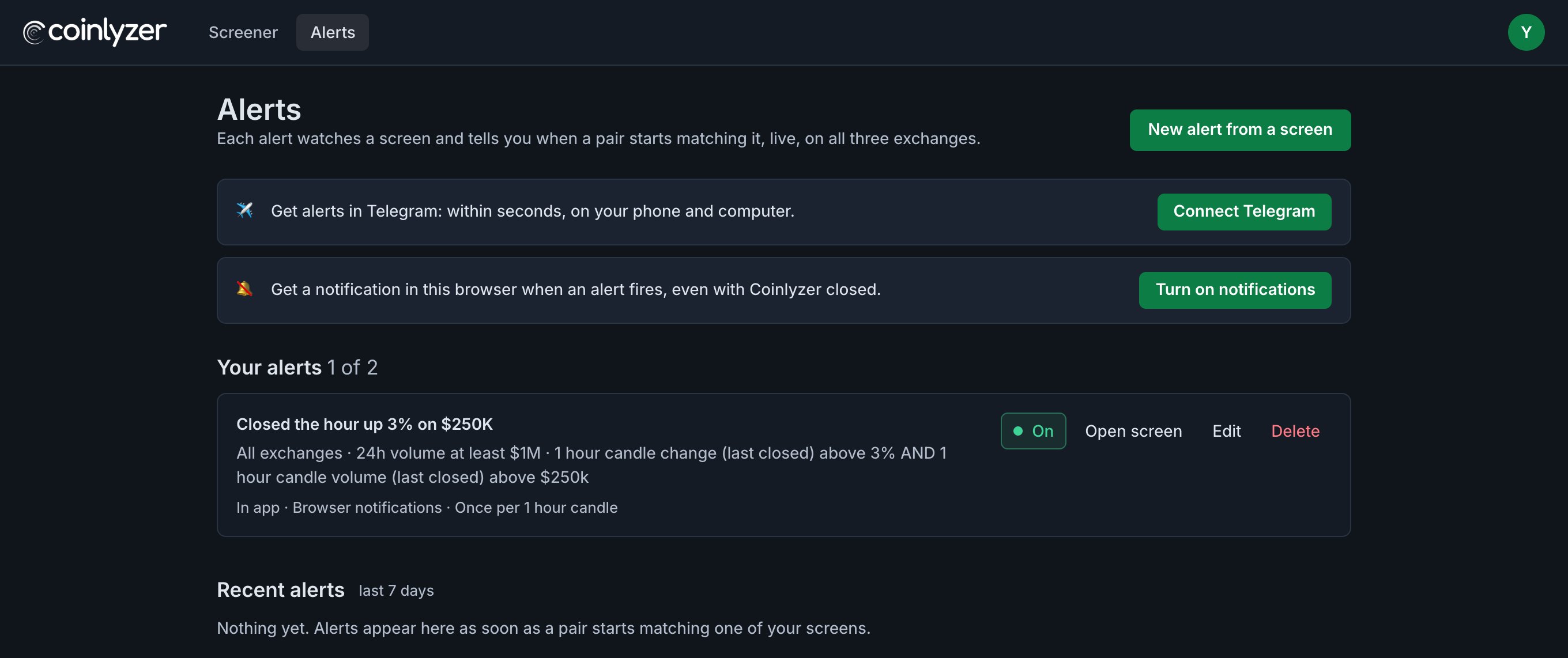
- On / Off pauses an alert without deleting it.
- Open screen loads the alert’s screen in the screener, so you can see what matches now.
- Edit changes the name, the channels and Same pair again. To change the rules, open the screen, change it, create a new alert and delete the old one.
- Recent alerts lists every time an alert fired, with its pairs: the last 7 days on Free, 90 days on Pro.
Try it on a real screen
This screen finds pairs whose last hourly candle closed up more than 3% on more than $250K. Open it, then press 🔔 Alert.
FAQ
Why didn’t my new alert fire right away?
Pairs that already match when you create an alert are its starting point and don’t fire. It fires when a pair starts matching after that.
Do alerts work when Coinlyzer is closed?
Yes. Alerts run on Coinlyzer’s servers. Telegram, browser notifications and email reach you with the app closed; the in-app pop-up needs the app open.
Can I change an alert’s rules?
Not directly. Edit changes the name, channels and repeat setting. To change rules, open the screen, change it, create a new alert and delete the old one.
How many alerts can I have?
2 on the Free plan and 30 on Pro. Each alert watches every pair its screen covers.
Does an alert use the screen’s filters?
Yes. Exchange, quote and minimum 24h volume filters are part of the alert, just like the rules.
Next guide
Alert channels compared: in the app, Telegram, push and email
Every Coinlyzer alert shows in the app; Telegram, browser notifications and email are extra. How fast each one is, where it reaches you, its limits, and which to turn on.
Related
Coinlyzer shows market data only. Screens and examples in this guide show how the product works; they are not investment advice or a recommendation to buy or sell anything. Screenshots may differ slightly from the app as it improves.