
Coinlyzer sends alerts through its Telegram bot, @CoinlyzerAlertsBot. You connect it from the Alerts page with one button and one tap on Start; there’s no code to copy and nothing to type.
Connect in two taps
Click Connect Telegram
It’s at the top of the Alerts page (Alerts in the app bar), and as a link in the alert dialog while Telegram isn’t connected. A new tab opens a link to the Coinlyzer bot, which opens the chat in the Telegram app, or in Telegram Web if you don’t have the app.
Press Start in Telegram
The link carries a one-time code that ties this Telegram chat to your Coinlyzer account. It’s valid for 15 minutes. Meanwhile the Alerts page waits for you:

While you press Start, the page checks every few seconds. Open Telegram again if the chat didn’t open. Done: the bot confirms
The bot replies “Connected.” and turns Telegram on for all the alerts you already have. New alerts get Telegram ticked by default. The Alerts page updates by itself:
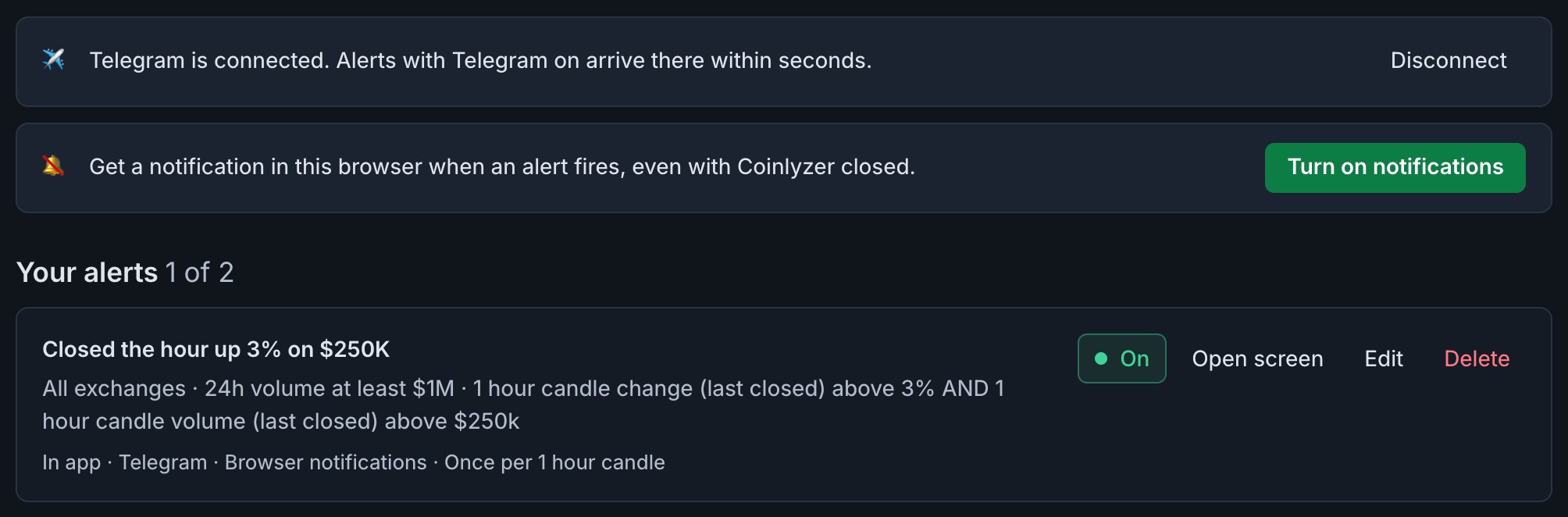
Connected, shown for a placeholder account. The page shows your Telegram username when you have one; each alert lists its channels.
If the bot says the link has expired or was already used, click Connect Telegram again for a fresh one.
What an alert looks like
Each alert arrives as one message, a few seconds after the pairs start matching:
- 🔔 and the alert’s name, in bold.
- How many pairs started matching, and the time in UTC.
- One line per pair, up to 20: the pair, its exchange, the price, and the value of the first rule’s column.
- and N more when more than 20 pairs started matching at once.
- Two links: Open this screen in the screener, and Manage alerts.
Telegram for some alerts only
Each alert has its own Telegram tick. On the Alerts page, click Edit on an alert and untick Telegram to keep it out of the chat; it still shows in the app and on any other channel it uses. See Alert channels compared.
Disconnect
Any of these stops alerts in Telegram:
- Disconnect on the Alerts page.
- Sending
/stopto the bot. - Blocking the bot or deleting the chat: Coinlyzer disconnects the next time it tries to send.
Your alerts keep running in the app and on their other channels. Connect again any time from the Alerts page.
FAQ
What is the name of the Coinlyzer Telegram bot?
@CoinlyzerAlertsBot. Connect it from the Alerts page with Connect Telegram, so it is tied to your account.
Can I get alerts in a Telegram group?
Not at the moment. The bot sends alerts to a private chat with you.
Does connecting Telegram cost anything?
No. Telegram works on the Free plan and on Pro. On Free, alerts send up to 10 notifications a day across all channels.
How do I stop Telegram alerts?
Click Disconnect on the Alerts page, or send /stop to the bot. To stop just one alert there, edit it and untick Telegram.
Does the bot ask for my password or keys?
No. It only sends your alerts, connects or disconnects with /start and /stop, and replies to anything else with a short help message. Connecting uses a one-time link from the Alerts page.
Next guide
Push alerts on desktop, Android and iPhone
Turn on browser notifications for Coinlyzer alerts on a computer, an Android phone or an iPhone (which needs Add to Home Screen first), and fix them when they’re blocked.
Related
Coinlyzer shows market data only. Screens and examples in this guide show how the product works; they are not investment advice or a recommendation to buy or sell anything. Screenshots may differ slightly from the app as it improves.